Clipboard Speaker 1.1
- Categoría: Text to Speech
- Licencia: Freeware
- Tamaño: < 1 KB
- Sistema: w95 w98 wNT wME w2000 wXP vista
- Idiomas:

Small voice synthesizer that reads text copied to the clipboard.
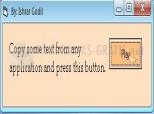
Clipboard Speaker, as the name suggests, is a small free tool designed especially to work with the Windows clipboard. Its job is to read the text that you`ve copied to the clipboard just by clicking the button.
If you want your PC to read the text you choose, just copy it via the contextual menu (right click), then click on "Play" in Clipboard Speaker and the voice of a man will start to speak the content. The only inconvenience, as such, is that the voice is in English, and for texts in other languages it is difficult to understand.
DownloadClipboard Speaker 1.1 related downloads
Text-To-VoIP Plugin 4.0.2
 Download
A plug-in for MorphVox that lets you speak via the Internet using all types of personalized voices.
Natural Voice Reader 12.0
 Download
Program to read any text you want. It also has an internet browser.